Showing posts with label android. Show all posts

Sunday, April 29, 2012

Review: Acer Iconia A100 Tablet

I've had myself on a little quest recently which lead to this review.  I wanted to find a tablet that's more of a mid to high range, not over-sized, fair on price, and with ICS (or at least a stable ROM for ICS I could put on it).

The trick on the "fair on price" part for my was trying to stay around a $200-$250 price range, simply because I have no plans on replacing my laptop with it.  However, I didn't want a huge loss in performance due to the price which would end up having my shelve it 3 months after getting it.  That appeared to be the trade with most that I found.  Most models around the price I wanted either had a huge dump in performance and quality, or the ROM and app support was limited due to it being a waste of time.

Honestly I thought I was going to end up having to buy a Nook or Kindle to find one under the qualifications.  I lucked out by randomly running into Acer's Iconia A100 model.

Specifications:
OS: Launched with Android 3.2 Honeycomb (updates for Android 4.0 Ice Cream Sandwich started 4/27/12)
Processor: Nvidia Tegra 2 1.0GHz dual core
Display: 7" LCD display, 600x1024 resolution 16M colors
Memory: 8 or 16 GB, 1GB RAM (up to 32GM MicroSD card)
Wireless: 802.11 b/g/n
Camera: 5MP primary, 2MP secondary

I've always heard good things about the Acer tablets.  The price tag telling me it's only $260 definitely got my attention.  The Nook and Kindle models both are right at $200, so paying a little more to get a full fledged tablet was definitely an option.

Right on the box it advertises the ICS upgrade which was essential for me.  I bought this now about a month ago and Acer right around that time announced the expected launch date for the upgrades.  They announced it to start on 4/27, and have all models finished by the first week of May.  I'll give them credit, my upgrade pushed on the first day as soon as I turned it on.

The Good:
Battery life on this was pretty respectable.  The Tegra processor does fairly well keeping me from having to plug it in constantly without having to sacrifice on performance.  I honestly haven't clocked the full charge time or anything, and the usage has varied from basic ebook reading, streaming Google Music, and cursing at Angry Birds.

The performance on this one is solid.  I keep pushing on, and it just keeps on going smoothly.  No lag or skip issues at all.  Apps open up and close quickly and no heat issues.

The screen looks great.  Photos and video hold full quality on it.  Outdoor use in the sunlight still holds up well.  There's only a minor amount of loss due to sun glare, nothing that would cause any real issue.  I have yet to test it on the HDMI connection to see how that goes.  The touch is also very responsive without being twitchy.  Everything so far with it has been very accurate.

I haven't found a lot of accessories from Acer directly for it, but the size and dimensions still keep it very compatible with most 3rd party options.  And of course Amazon offers a ton that work and at a good price.

It has a dedicated screen lock button!  Yes I know I'm excited over something simple, but I use this a lot.  Most times I keep the tablet and even my phone in portrait mode.  I'm personally not a fan of landscape, and the constant rotation drives me nuts.  This makes it much more convenient than having to go 3 layers deep in the settings or waste space on a shortcut widget.

Kudos to Acer for not going crazy on the UI.  Personally I'm not a fan of the Sense UI and others that overlay a lot of their own stuff on top of stock ICS.  It tends to slow it down and use more battery for a lot of options I don't really ever utilize.

Thanks to the size, I can hold it in portrait mode and reach the full keyboard to type with my thumbs.  No need to prop it up on something to be able to tweet, etc.

The Bad:
The weight is a bit of a concern.  Most tablets now are pushing to get super thin and light weight.  The A100 isn't a brick by any means, but it's got more bulk than a lot of the other options on shelves.

Personally I'm not a huge fan of Honeycomb.  It's not a bad OS, it just lead a lot to be desired with some of the UI and support on apps.  Anyone who has the tab needs to do the ICS update immediately.

Personally, I'm not a fan of proprietary charging cables.  It does have the normal micro USB cable for data transfer, but it doesn't charge through USB.  Luckily the charger cables can normally be found online between $16-$20 each.

If you're a fan of the overloaded UI, this tablet isn't for you.  There's plenty of UI replacement apps you can use though to compensate at least.  It won't be that super fancy UI experience though.

Overall Impressions:
I'm beyond happy with the choice to pick this one up.  Keeping with the 7" display maintains the portability I wanted so I can take it around and not feel like I'm just carrying my laptop.  After a month in with it, I really have no big complaints about it.  If you're looking for a good tablet and not needing to go absolute top end, it's probably one of the best choices on the market and you can't beat the price.

Ok, time for the photo session.  Yes, I know my ability to take good product pics is .....well ......lacking.  But hey, they're not too bad.

Product box, with previously mentioned ICS upgrade in the corner.

Front view with the manufacturer sticker still on it. 

More front view in box.


One of my own wallpapers with the stock UI widgets. 


One of the third party cases I found locally. 

Tuesday, March 6, 2012

When Did iTunes come to Google?

When I logged into Google Music (on the web) this morning it looked normal, until I hit an album to play. Then I got this:


Um, where is my beloved Android Market and why does this look like a Google-fied version of iTunes?

Wait, let's hit that learn more button ....


Google is planning to move all of your content into Google Play. 


Play Anywhere

All your entertainment in one place

Google Play is your one-stop shop for all your favorite entertainment. With over 450,000 apps, millions of songs and books, and thousands of movies, Google Play has something for everyone. Before you decide what you want, sample a free music or book, view app ratings, reviews, and screenshots, or watch a movie trailer. Google Play is a more connected, powerful experience.


There's more here detailing every aspect of the updated market -- books, apps, movies, games, and music. They really should have added some playground graphics as much as they mention the word "play".

For your phone and/or tablet:
Updating Android Market/Google Play
If your device can be updated, the Android Market app will automatically update to the Google Play Store app. Once you have it, the Google Play Store app automatically updates itself when new versions become available. This is a silent update, which means you will not see a notification and will not be prompted to update.

But you know what? I still can't uninstall apps!!!


Want to know more? Here's the downlow:
 Q: What is Google Play?
A: Google Play is a new digital content experience from Google where you can find your favorite music, movies, books, and Android apps and games. It’s your entertainment hub: you can access it from the web or from your Android device or even TV, and all your content is instantly available across all of these devices.

 Q: What is your strategy with Google Play?
 A: Our goal with Google Play is to bring together all your favorite content in one place that you can access across your devices. Specifically, digital content is fundamental to the mobile experience, so bringing all of this content together in one place for users makes the Android platform even more compelling. We’re also simplifying digital content for Google users - you can go to the Google Play website on your desktop and purchase and experience the latest movies, music and books. With Google Play, we’re giving you a simpler way to get your digital content.

 Q: What will the experience be for users? What will happen to my existing account? 
A: All content and apps in your existing account will remain in your account, but will transition to Google Play. On your device, the Android Market app icon will become the Google Play store icon. You’ll see "Play Store." For the movies, books and music apps, you’ll begin to see Play versions of these as well, such as "Play Music," and "Play Movies."

 Q: When will I get Google Play? What markets is this available in? 
A: We’ll be rolling out Google Play globally starting today. On the web, Google Play will be live today. On devices, it will take a few days for the Android Market app to update to the Google Play Store app. The music, books and movies apps will also receive an update today. Around the globe, Google Play will include Android apps and games. In countries where we have already launched music, books or movies, you will see those categories available in Google Play, too.

 Q: I live outside the US. When will I get the books, music or movies verticals? I only see Android apps and games? 
A: We want to bring different content categories to as many countries as possible. We’ve already launched movies and books in several countries outside the U.S. and will continue to do so overtime, but we don’t have a specific timeline to share.

Q: What types of content are available in my country? 
Paid Apps: Available in these countries
Movies: Available in US, UK, Canada, and Japan
eBooks: Available in US, UK, Canada, and Australia
Music: Available in US

Q: Does this mean Google Music and the Google eBookstore will cease to exist? What about my account? A: Both Google Music and the Google eBookstore are now part of Google Play. Your music and your books, including anything you bought, are still there, available to you in Google Play and accessible through your Google account.

 Q: Where did my Google eBooks books go? Will I still have access to them? 
A: Your books are now part of Google Play. Your books are still there, available to you in your Google Play library and accessible through your Google account.

 Q: I don’t use an Android phone, can I still use Google Play? 
A: Yes. Google Play is available on any computer with a modern browser at play.google.com. On the web, you can browse and buy books, movies and music. You can read books on the Google Play web reader, listen to music on your computer or watch movies online. Your digital content is all stored in the cloud, so you can access from anywhere using your Google Account. We’ve also created ways to experience your music and books on other platforms such as the Google Books iOS app.

Q: Why do I not see Google Play yet on my device? 
A: Please see our help center article on this here.

 Q: How can I contact Google Play consumer support? 
A: You can call or email our team here.
Enhanced by Zemanta

Monday, December 12, 2011

NOOK Color™ - Gets 1.4. Who needs a tablet?

I am so freaking stoked!!! Too bad I already took my lunch break. I never successfully dual-booted my Nook, for some reason CM7 and I don't get along (by the way, if you need something broken, send it my way).

I went into a B&N the day the tablet dropped and saw that new Nook Color's were shipping with 1.4. For the last 3 weeks I have been anxiously waiting my software update. And now it's here!!! I got the email less than an hour ago (about the only good reason to register your devices, people). So it's not as fast as the Nook Tablet .. I can live with that. Over the last few months I have realized that I am not the demo for a tablet user. I use my laptop for way more things than the casual tablet user. And my phone. But I read (and play Scrabble) a LOT on my Nook. And now I can watch Netflix (and other streaming content) while my boyfriend watches sports on the big screen :D
Image courtesy of Barnes & Noble
Among the new features, NOOK Color v1.4.1 now offers access to streaming popular movies and TV shows through Netflix, comics and graphic novels, new PagePerfect™ NOOK Books™, reading NOOK Books in portrait and landscape modes, and many other enhancements through-out the device. 
To get the update manually, you can download the software update to your computer at any time and then copy it onto your NOOK Color. Simply follow the steps below. Manual Download Instructions:

1. From your computer, click here for the software update file. Select Save and select Desktop as the location. Do NOT modify or change the downloaded file's name in any way. Do NOT open the *.ZIP file.
2. Press the Home Button and then tap Settings on the Quick Nav Bar. Then tap Device Info and make sure your NOOK's battery charge is at 20% or more.
3. Connect your NOOK Color to your computer using the USB cable that came with your device. A new, removable drive should show up in My Computer (Mac users will see the NOOK drive appear on the desktop or in devices). You should also see a "USB Mode" message on your NOOK screen.
4. From your computer, drag and drop the downloaded *.ZIP file onto the main directory of the NOOK drive. Do NOT open or unzip the file. You should not create a new folder on the NOOK drive or add the file to any other existing folder.
5. Eject or Safely Remove the NOOK drive after the file transfer is complete.
6. Your NOOK will automatically recognize the file after a few minutes when it goes to sleep mode, and proceed to install the updates.
7. Please do not turn off your NOOK during the installation process.
8. Once the installation is completed, your NOOK will automatically restart and go to the unlock screen.
9. On the bottom left status bar a green "n" will appear. Tap on it for additional information; the software has been successfully updated.

NOOK Color must remain turned on while the update is being installed. Once the software is installed, your NOOK will automatically restart. To verify you have the latest update, tap Settings from the Quick Nav Bar, tap Device Info, then tap About Your NOOK, and check to see that your software version number matches the number at the top of this page.

Congratulations, your NOOK Color has been updated! If you need additional help, please call Digital Customer Service support at 1-800-843-2665.

I wonder if I can install the update via Dropbox....
Enhanced by Zemanta

Friday, June 17, 2011

Nook Color - First Impressions

I've been keening for a Nook Color since about Mother's Day. I don't really *need* a tablet or a newer eReader, but I wanted one, because I am a gadget queen. I didn't even want one when it was announced last fall, mainly because I was looking at the Viewsonic Gtab as a tablet and already owned an Aluratek Libre Pro.

The Nook Color is being advertised as "the most affordable Android tablet on the market", and a pretty nifty eReader too. It's finally in my hot little hands thanks to @hankito. I was actually going to wait to save up the $250 (it's $249 from Barnes and Noble) but we can't pass up a good sale!


Now for the interesting bits.

Unboxing
I was so excited I didn't bother doing an unboxing video, but I was eerily reminded of when I unboxed my Nexus One. By the way, my Nook looks like the big sister of my N1! First impression - ABSOLUTELY GORGEOUS! and then the let down as I waited 3 hours for it to charge.

I still booted up that night before going to bed. The color screen is amazing! I had to turn the brightness down a bit for playing with it reading in bed.

Weight
Girlish accessorizing bits aside, I am loving this eReader/tablet. Some people have complained that it's too heavy. I also have an Aluratek Libre, bought just over 15 months ago. I like it. The battery life could be longer, but it has served me well. And it is incredibly light. The Nook Color is just under a pound and feels comparable to a hefty hardcover. I can hold it in one hand comfortably for over an hour and not feel fatigued.

Formats and Media Storage
The main reason I chose the Aluratek over the Kindle was the formats that it handles. The same goes for the Nook:
  • eBooks - EPUB (including Non or Adobe DRM), PDF
  • Other Docs: XLS, DOC, PPT, PPS, TXT, DOCM, XLSM, PPTM, PPSX, PPSM, DOCX, XLX, PPTX    
  • Graphics: JPG, GIF, PNG, BMP    
  • Audio: MP3, MP4, AAC
  • Video: MP4
I am not confined to one book store! I tested this by adding books I had bought from Borders to the NC. You need to have Adobe Digital Editions installed, authorize your device, and voila! Any book from NetGalley and Borders that I had previously purchased now reside on my Nook. I am a happy camper indeed. I also tested out safaribooks.com on the browser. You can read the books in the browser (the text flows beautifully), or download the PDF for offline reading. Win! I can also add to the included 8GB internal storage with up to a  32GB micro-SD card.

Screen
The screen is quite bright, but both screen brightness and font are customizable. You can choose between six different font sizes, six different page flows/margins, and six fonts - three serif and three sans serif.

I got a cover to go with the NC to protect it and give me that feeling of holding a traditional book.

The only thing I miss is the "Back" button, but I am getting used to pressing the home button or the "app drawer" that brings up the menu to go to my library, shopping, apps, the web, or settings.

Apps:
Of the pre-installed apps, I am addicted to the crossword puzzle game. Fair warning, to download any free books, apps, or even start your 14-day free trial of magazines you need to have a credit card on file. I did install goodreads and Seesmic since they are free. I have Angry Birds for free on my phone and didn't feel like paying to have it on my Nook. Right now most of the apps are premium, the main motivating reason for me to get it rooted. I want access to the Android Market.

The on-screen keyboard is amazingly responsive, as is  auto-rotate (which you can turn off in settings if you need to). I want to get HBOGo on it so I can catch up on episodes of Game of Thrones!

Things I still need to test out:
  • Root with CM7 Nook mod
  • Maybe install NookieHoneyComb 
  • Test out the actual battery life. It's advertised as 8 hours of reading with wi-fi off
  • Nook Friends and LendMe - I connected to twitter and Facebook and my address book and it found a few of my friends who also use the LendMe option. 
  • B&N Specials
    • Bring NOOK Color into any Barnes & Noble store to get exclusive articles from top authors, and great offers including cafe treats and unique deals.
    • Read NOOK Books free when connected to the free in-store Wi-Fi®.  I can do this while the Teen browses for hardcover versions. He hates using an eReader.

Monday, May 23, 2011

Review: Nexus S 4G


Finally it's around.....a pure Google phone on Sprint.  I've been waiting a long time for it while the T-Mobile kiddies taunted us with their joys.  Coming from an Evo 4G and Epic 4G, I've already got a high set of standards for performance and features.  I'll admit I was hesitant to get it at first considering Samsung's track record on phones, but the phone not including their software was a win for me.


As for hardware specs, it stacks up pretty nicely:


  • Android 2.3 Gingerbread
  • 1GHz Samsung Hummingbird processor 
  • 1xEV-DO CDMA and WiMAX 4G radio
  • 4 inch 480×800 pixels Super AMOLED display
  • Integrated 16GB flash drive with no expansion card slot
  • 5 megapixel camera with LED flash
  • VGA front facing camera
  • Dedicated, touch-sensitive Back, Menu, Search, and Home keys
  • Proximity sensor, light sensor and digital compass
  • Integrated A-GPS
  • Wi-Fi (802.11 b/g/n)
  • Bluetooth 2.1+EDR
  • 3.5 mm headset jack
  • 1500 mAh lithium-ion battery
  • Dimensions: 123.9 x 63 x 11.2 mm and 129 grams


I've had this phone about 4 days now and have really enjoyed Gingerbread.  The battery life has gotten better, even with my constant abuse on it.  Time for the run down on the device......


Display:
The display is the Samsung Super AMOLED screens which are freaking beautiful.  Some people I've heard from say it's not as good on quality as the Epic, but after some testing I've seen the opposite.  One thing to consider is the UI that Samsung uses is a lot sharper and has brighter colors than Google. After installing ADW and changing out the stock icons, I found the quality just as good.  


The screen itself has a slight curve to it.  Not quite sure why this was done, but it didn't affect quality it any way.


Camera:
The phone has what's become almost standard now with the front and back side cameras.  I do wish they had gone with an 8MP camera on the back as it's in so many offerings, but I've been happy with the quality on it regardless.


One camera feature missing in the stock Android software is the focus option.  If you hold down the shoot button for the picture, it will still do a fine focus on the image, but no zoom in and out option.  That's.....well.....weird.


Video recording looks good.  Unfortunately Samsung elected to only do 480p recording as opposed to 720p HD like the other models.


One thing some might miss is a dedicated camera button on the side.  This was a little different at first, but then I realized I was no longer hitting the button on accident.  Easy replacement is just using an icon.


Android 2.3:
This thing is FAST.  Even with installing a ton of apps after my joy in how much storage it has, the OS hasn't skipped a beat and moves through everything very quickly.  Google did a good job under the hood of kicking up the performance on this one.  I did replace the stock home screen with ADW purely for the customization options.  


The photo gallery software included in Android is great.  It does a 3D tilt and angle kinda thing for viewing which is a nice touch.  Samsung used the same feature with their Epic phone, so I was pleased I got to keep it.  One thing I did notice when I first loaded in my pics.....let it sit there and load everything the first time.  It wants to be left alone to load them all the first time, and it will let you know about it when you try to scroll through.  Once loaded up, the pics scroll through seamlessly.


The stock browser works pretty well.  Page load times are fast, no issues running flash, and no quirkiness.  It's still not as good in terms of features and extra as some other options like you get with Dolphin Browser, and the gesture reactions aren't as good.


The stock keyboard is ok.  I wouldn't be the first to praise about it, but it gets the job done.  You're not going to get any extras in the stock build like Swype, but these can always be added to accommodate what you prefer.


Look and Feel:
I kinda like the curved design to it.  That along with the weight make the phone very easy to hold and use comfortably.


The shell has more of a plastic feel to it than most phones, but it still doesn't feel like cheap material.  I admit I am more spoiled on the cases that HTC uses, as they feel more durable.


The phone does lack an LED light on the front for notifications.  There are some other options which give you an on screen notice like NoLED.  Some people are reliant on that light, so if it's a must this may not be the phone for you.  Me personally, my phone always has a notice for something, so I usually ignore the light anyways.


Final Thoughts: 
I'll be the first to admit, this phone isn't for everyone.  If you rely on extra features some manufacturers include in their UI, you will be left out.  There are comparable substitutions on the market, but some features are still exclusive.  Getting a pure Google phone though is a nice jump in performance and battery life.


Overall battery life is better on Gingerbread, which is much needed on Android in general.  Believe me, it'll never make a Blackberry owner jealous.  Then again, then can't do 1/4 of the things we can do with our phones.  I personally would still recommend at least a task manager, or better something like JuiceDefender which manages that nasty data use when the phone is idle.  I've yielded better results with this compared to most other apps, and the purchase for the pro version is worth it.


The selling points to the phone are it's pure Google with no carrier BS, which means it's first to get all the updates.  There's no waiting for the manufacturer to make all their stuff work with it, and then the carrier.  Google makes it, I get it immediate.  Google has also done a solid job overall in the OS, so it holds it's ground with any other competition.

Wednesday, May 11, 2011

Google Music Beta is running, accepting invite requests


At the Google I/O yesterday, Google Music Beta has announced to much acclaim.  Info has been flying around on this one for some time now, and we finally get an opportunity to get hands on with it.  Ok, well those of us who get the beta invite.  Yes, I'm anxiously waiting for mine.

The service let's you upload up to 20,000 songs (that's not a typo) to your online account and stream them to devices like your computer, phone, or tablet.  You can make your own custom playlists, or use a feature called "instant mix" which is automatically configured based on one song you choose.

The service does require Android 2.2 or higher, and is currently only available in the U.S. right now.  The link below is the app download for those who get their invites.

Android Market link for Music 3.0

Wednesday, April 27, 2011

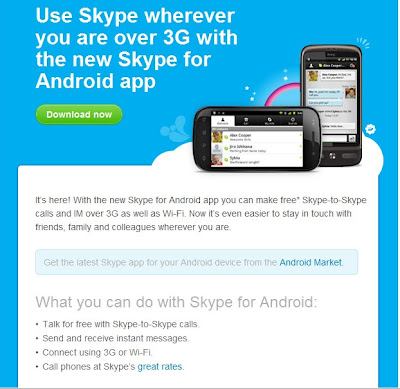
Skype Now Makes Calls Over 3G

Download the updated Skype app and start making free calls.
With the new Skype for Android app you can make free Skype-to-Skype calls and IM over 3G as well as Wi-Fi.
Posted by Picasa

Friday, February 11, 2011

Dell Streak 7 on T-Mobile

The much rumored about, talked about, hyped about first 4G tablet is now available for sale at your local T-Mobile store.

Tablets are definitely trying to take over as our go-to entertainment devices as well as mobile communicating. T-Mobile brings a lot to the table with the Dell Streak 7, billed as "Entertain the whole family with our first 4G tablet, powered by Android™" . Family-friendly apps like BrainPOP, video chat by Qik, books and magazines (pre-loaded with the Kindle app and you can get full color magazines from Zinio), T-Mobile TV and movies from Blockbuster make this something you may have to fight your kids for.


Specs:

  • 7-inch multi-touch screen
  • 17.6 oz (just over a pound)
  • Watch your favorite shows on the go with T-Mobile® TV
  • Thousands of family friendly apps—like BrainPOP™, Zinio™, Kindle™ for Android™, and Blockbuster™. T-Mobile® TV brings you a selection of Live and on demand TV, including news, sports, and full episodes of kids’ programming.With Blockbuster® you can watch the newest movies while on the go—with no monthly fees.
  • Talk live with T-Mobile® video chat powered by Qik™ with front- and rear-facing cameras
  • Full Flash® 10.1 support 

Enhanced by Zemanta

Wednesday, February 2, 2011

Android Market Launches


As reported by HTC today, the Android Market is live! Just like AppBrain you log-in using your Google credentials.


What's the big deal?
  • Apps and games galore
    Immerse yourself in the rich world of apps and games limited only by the imagination of the Android development community. Choose from a huge selection of games ranging from action to casino to casual, or from categories spanning social, travel, health, productivity, entertainment, and more!
  • Shop on the big screen tailored just for you. 
    When signed-in to Android Market with the same account you use on your phone, you see the content meant for your device and can send it to your device immediately, without needing those pesky cables.
  • Share and share alike. 
    Send links for your favorite apps to your friends, even the ones without Android phones.

As of this writing I am still getting an error from Google, so hopefully I will be able to explore and add apps soon. I can't wait to explore the market on the big screen and try out all the options once I am logged in. In the mean time, I'll window shop.

I wonder how this will affect AppBrain?
Enhanced by Zemanta

Wednesday, December 15, 2010

Top Tweets of 2010

Twitter has announced their prelim statistics for end of year 2010.  It's being estimated that there was somewhere around 25 billion tweets sent out so far this year, which is pretty huge for a social media platform many people still disregard.


The oil spill obviously took first place honors, but I admit I'm happy to see Android beat out Bieber in the rankings.  Seeing as how that kid only ranked 8th, I'm sure billions of little tweenies will be crying over this one.


Top 10 Twitter Trends of 2010
1. Gulf Oil Spill
2. FIFA World Cup
3. Inception
4. Haiti Earthquake
5. Vuvuzela
6. Apple iPad
7. Google Android
8. Justin Bieber
9. Harry Potter & the Deathly Hallows
10. Pulpo Paul

Google App Inventor Open To All


App Inventor has been around for a good amount of time now, but was only available to a select few.  The tool is primarily there to help with faster development of apps before the point of getting heavy into code, and help with teaching development for new developers.

Those days of being selective are over, and the App Inventor is open to everyone!

You'll need a Google account obviously, and to download the installer.  Some phone models are included in the driver list, and some others you may need to manually download a driver for.  The website has a pretty simple walk through to get you up and running.  Just hit your browser over here.

HTC Evo 4G Update v3.70.651.1 Available


It's not Gingerbread (sigh), but HTC rolled out an update today for you Evo owners to enjoy.


I haven't messed with it much so far as it just finished installing earlier, but some of the changes are nice.  Telenav is always a solid choice for maps if Google Maps isn't your preference.  And well, what do I really need to say about Kindle?  It's pure win in the eReader community.


I thought about trying NOVA, but after seeing it required a 74MB update before I could play, I decided against.  I honestly don't use Sprint TV that often, but if the update rolls in a few more free features to offset all the paid content, I'm good with that.


I would comment on having SWYPE on here, but I'm honestly still trying to get it to work.  >:(


If your phone is set to auto update, you should be getting the push for it pretty soon.  If you want to manually update instead of waiting around, follow these steps:
Settings > System Updates > HTC Software Update


The full update list is as follows:

  • Blockbuster

  • Kindle eReader

  • NOVA (new game)

  • Sprint Zone update

  • Latest Telenav

  • Latest VVM App

  • Sprint TV update

  • SWYPE Keyboard

  • Scan Now Widget for 4G


  • Monday, September 27, 2010

    New phone angst: Samsung Vibrant vs. Google/HTC Nexus One

    Oh … what a dilemma!!! So, I took advantage of the T-Mobile BOGO. Yesterday I called T-Mobile’s customer service line and verified that I was indeed eligible for an upgrade at the BOGO special, verified that the special was still ongoing (it was supposed to have ended in early September but has been indefinitely extended) and that I could extend payments over a few months on my bill. All was a go. Oh, and I changed my contract from myFaves 400 (no longer available) to Even More for Families 750 (we hardly talk on the phone, but we are mad texters) so that I could also take advantage of the Kids are Free promotion (hello savings of about $240 over the course of the next year).
    In general, this is a no-brainer – keep the Nexus (oh I love this phone!) but @hankito has become a full-on convert to Android (used to Apple and iPhone all the way) and has spent so much time one the XDA Forums over the last month, that he now knows how to root and put different ROMs on the phone in the space of a few minutes. He rooted my Nexus using a 1-click app in less that 10 minutes yesterday morning (no @cyanogen mod on it yet though, I still want the chance to get in there and play around a bit myself).
    A non-rooted, non lag-fixed, non-GPS fixed, non-Froyo Vibrant is … underwhelming. It’s downright frustrating! (and meh) Froyo was such a huge improvement to the Android OS that not running it, despite the absolutely GORGEOUS display on the Vibrant is well … not worth it. And there’s no Flash – Adobe or camera. And I really like my LED notifications and trackball.
    So, should I switch just to have the latest android phone (before the G2 anyway)?
    Nexus One Specs
    Dimensions: 4.69" x 2.35" x 0.45"  
    OS: Google Android 2.1 (now rooted with 2.2)
    Weight: 4.59 oz (130g) 
    Internal Memory: 174MB
    Talk Time: 7 hours (420 minutes) 
    Nexus One Bluetooth: A2DP
    Standby: 250 hours (10.4 days) 
    Connector: micro-USB
    Nexus One Battery: 1400mAh Li-Ion 
    Touch Screen: Finger capacitive
    Screen Size: 3.7" 
    Nexus One Memory Card: microSD
    Display Res: 480x 800 pixels 
    Camera: 5 megapixel
    and more
    I'm wanting to keep my Nexus until Gingerbread is released.
    Vibrant Specs (Also known as Samsung T959 Galaxy S)
    Dimensions: 122.4 x 64.5 x 9.9 mm
    Weight:117.9g (lighter than the Nexus)
    DISPLAY: Super AMOLED capacitive touchscreen, 16M colors
    Screen Size
    480 x 800 pixels, 4.0 inches
    - TouchWiz 3.0 UI
    - Multi-touch input method
    - Accelerometer sensor for UI auto-rotate
    - Touch-sensitive controls
    - Proximity sensor for auto turn-off
    - Swype text input
    MEMORY
    Phonebook
    Practically unlimited entries and fields, Photocall
    Call records
    Practically unlimited
    Internal
    16GB storage, 512 MB RAM
    Card slot
    microSD, up to 32GB, 2GB card included, buy memory
    DATA: GPRS Class 12 (4+1/3+2/2+3/1+4 slots), 32 - 48 kbps
    EDGE Class 12
    3G HSDPA; HSUPA
    WLAN Wi-Fi 802.11 b/g/n; DLNA
    Bluetooth Yes, v3.0 with A2DP
    USB
    Yes, v2.0 microUSB
    CAMERA
    Primary
    5 MP, 2592 x 1944 pixels, autofocus
    Features
    Geo-tagging, touch focus, face and smile detection
    Video
    Yes, 720p@30fps
    FEATURES
    Android OS, v2.1 (Eclair)
    CPU: 1GHz Samsung Hummingbird processor
    Radio: Stereo FM radio with RDS
    GPS
    Yes, with A-GPS support (currently broken, waiting for the official fix, or you can get it in the xda forums)
    Java
    Via third party application
    - Social networking integration
    - Digital compass
    - MP4/DivX/WMV/H.264/H.263 player
    - MP3/WAV/eAAC+/AC3/FLAC player
    - Organizer
    - Image/video editor
    - Document editor (Word, Excel, PowerPoint, PDF)
    - Google Search, Maps, Gmail,
    YouTube, Calendar, Google Talk, Picasa integration
    - Flash Lite v3.1
    - Voice memo/dial/commands
    - T9
    BATTERY
    Standard battery, Li-Ion 1500 mAh
    Stand-by
    Up to 432 h
    Talk time
    Up to 6 h 30 min
    Do you have a Galaxy S phone? Still drinking the Apple Kool-Aid? Or waiting for the G2?
    Related articles by Zemanta
    Enhanced by Zemanta

    Wednesday, September 22, 2010

    Dropbox Android app update

    Dropbox 
    Dropbox v 1.0.0.1 is now available for download. There has been some trouble with getting from the market, so you can use the QR code or download from http://db.tt/d7N59Lo
    --------------
    Release Notes:
    1.0
    • Better retry logic on failed uploads
    • Fixed syncing of edits made to files opened from search results view
    • Other minor bug fixes
    0.9.8.9 Beta
    • Added support for Audible's .aa and .aax file formats
    • Changed Gallery UI design slightly
    • Bug Fixes


      • Up-to-date version of file is downloaded when changed remotely.
      • Stability, fixed several FCs, and other improvements
    0.9.8.8 Beta
    • Added "Share to Dropbox" from other applications (Gallery, etc). Either single or multiple files can be shared at the same time.
    • File Downloads & Uploads now display progress notifications instead of Spammy Toasts.
    • Multi-touch Gallery for pictures in a directory. Long-hold on pictures in gallery to do file operations.
    • Now you can create Shortcuts to Dropbox folders by long-holding on the desktop.
    • Added long-hold folder options for sharing and open.
    • Long-hold file Open now plays non-streaming, if it's a streaming file type.
    • Added Cache Size display and Clear Cache button.
    • Prompt to install file manager such as OI or Astro if one is not installed already.
    • Notification if SD card is unavailable, so downloads, viewing, or uploads won't work.
    • The e-mail to tell friends about Dropbox now contains a referral link, so you can get a quota bonus.
    • Visual Redesign with new icons
    • Bug Fixes


      • Small file changes now sync properly
      • Files don't re-upload any more on upgrade or re-install
      • Increased network timeout so it works better on slow networks
    -- from Dropbox Forums

    I do believe I may be getting a few more Audible books.

    Audible
    Get Audible here:

    Wordfeud - Now Ad Free!


    Just a quick announcement. If you happen to be addicted to Wordfeud (like I am) You can now make a donation to support further development of Wordfeud. In return the ads will be removed from your game. To make a donation, go to wordfeud.com/donate/
    Make sure to update to v1.0.8 first (just released to the market).

    Thursday, September 9, 2010

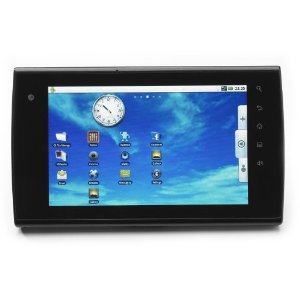
    eLocity A7 7" Android Tablet on Amazon Pre-order Now

    Looking for an Android tablet?  Stream TV has their eLocity A7 available for pre-order now for $369.99.  Not a bad price for hardware like this.  By all comparisons, it looks like a solid jump in the tablet market for Android fans, and best of all it includes FROYO!  Jumping for joy in 3...2...

    Jump to Amazon by clicking here to order.


    Features

    • NVIDIA® Tegra™ II T‐20, 1GHz, 1MB L2 Cache 
    • 512 MB DDR2 RAM 
    • Android™ 2.2 Operating System 
    • 4GB High Speed Internal Flash Memory 
    • 7” Capacitive Touch Screen, 800x480 
    • 0.5W Stereo Speakers 
    • 1.3MP Webcam 
    • 3.5mm Stereo Headphone Jack 
    • 802.11b/g Wireless 
    • Bluetooth® 2.1 Enabled 
    • 1 x USB 2.0 Port 
    • 1 x Micro SD Card 
    • 1 x HDMI 1080p Output 
    • Docking Port
    • 8.2” x 4.8” x 0.5”, 1.02 lbs 

    Connections:

    • 1 HDMI output
    • 1 USB 2.0 input
    • 1 MicroCard input
    • 1 Docking Port
    • 1 3.5mm Stereo Headphone Output